
Refund a payment
What this does
Section titled “What this does”Records money you give back to a customer, in full or in part.
- For a card payment made online, AysOps sends the refund through Stripe, from your Stripe account.
- For cash, cheque, e-Transfer and other payments you recorded yourself, AysOps only records the refund. You hand the money back however you agreed with the customer.
A refund can’t be undone, and AysOps never refunds on its own: a person always decides.
Before you start
Section titled “Before you start”- You need the Refund payments permission (owners, admins and managers by default).
- Your refund policy (Settings → Profile → Business) is shown at the top of the form, so you can check it before refunding. See Business profile.
- Open the customer’s Invoices tab and click the invoice.
- Under Payments received, click Refund beside the payment.
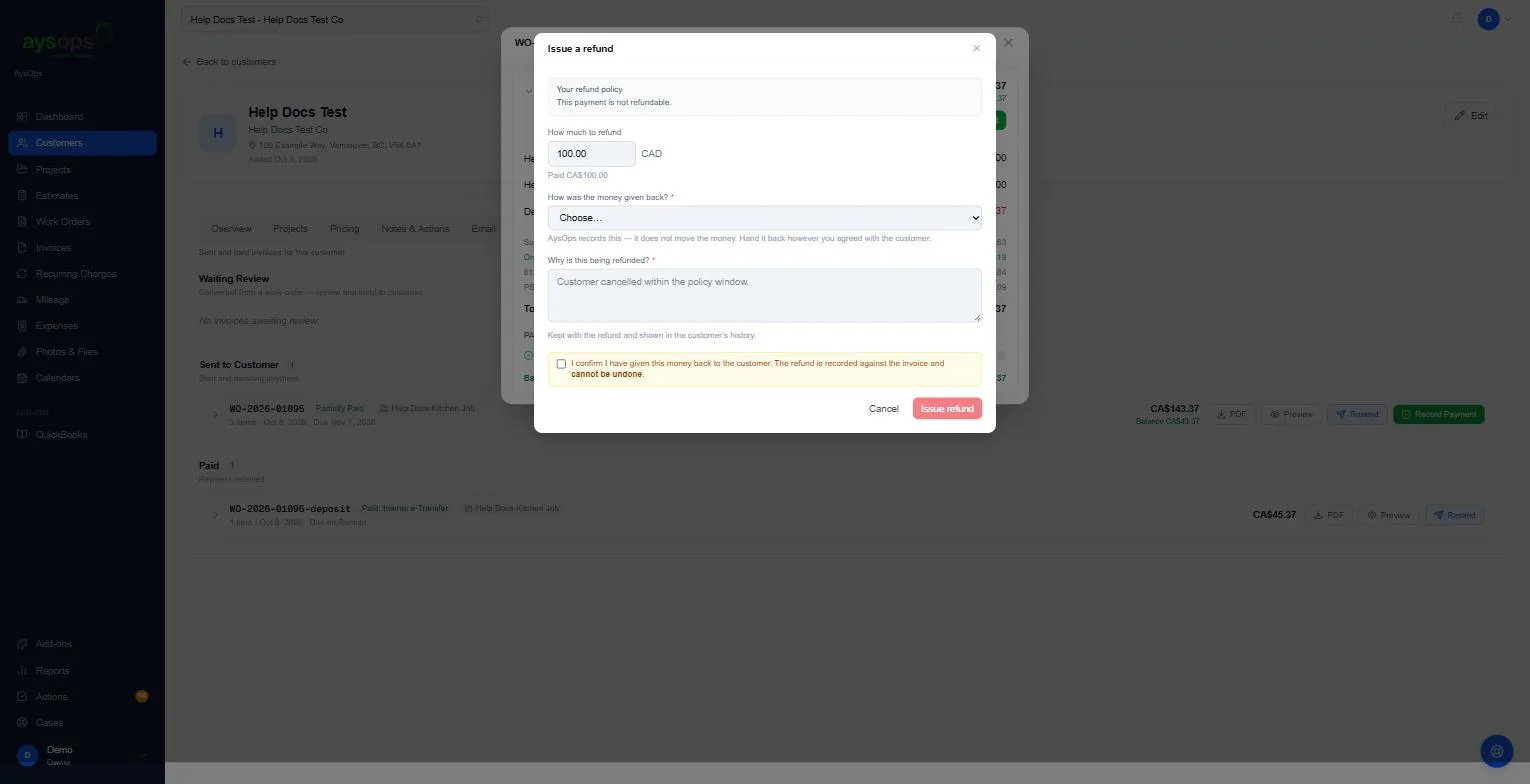
- Fill in Issue a refund. At the top, Your refund policy reminds you what you told customers
(for example “This payment is not refundable.”). It’s only a reminder: you can still refund.
- How much to refund: up to the amount paid. For a card payment you’ll see two shortcuts: less fees and in full.
- How was the money given back? (only for payments you recorded yourself): choose how you returned it.
- Why is this being refunded? (required): for example “Customer cancelled within the policy window”. It’s kept with the refund and shown in the customer’s history.
- Tick the confirmation. For a payment you recorded: I confirm I have given this money back to the customer…. For a card payment: I confirm this refund. The money leaves your Stripe balance and cannot be undone.
- Click Issue refund.
If the payment bought a prepaid pack, the form says so above the amount: any refund ends the pack, whatever the amount. What the customer has left can no longer be used, and what they already used stays used. Prepaid packs come with the Customer Portal add-on. See Sell prepaid packs of hours or classes.
What happens next
Section titled “What happens next”- You’ll see Refund recorded. (a payment you recorded yourself) or Refund sent (a card payment; it appears on the invoice shortly, once Stripe confirms).
- The invoice’s label changes from Paid to Refunded or Partly refunded, followed by the amount given back. The invoice still counts as paid, so no pay link or automatic payment starts again.
- A refund doesn’t change the invoice’s Balance (what is still owing).
- You can refund the same payment again until all of it has been given back. After that the form says “This payment has already been refunded in full.”
About fees (card payments)
Section titled “About fees (card payments)”Neither Stripe’s processing fee nor the AysOps fee is returned. Less fees gives back the amount minus those fees. In full gives back everything, and you absorb the fees.
Related articles
Section titled “Related articles”refund, give money back, return payment, reverse payment, partial refund, full refund, refund policy, stripe refund, fees