
Travel rates (charging for mileage)
What this does
Section titled “What this does”A travel rate is what you charge a customer for driving: per kilometre, per mile, or a flat amount per trip. You choose it when you mark a mileage trip as billable, and the charge is added to the customer’s work order.
Before you start
Section titled “Before you start”- You need permission to manage rates (owners, admins and managers by default).
- Add your tax rates first if travel is taxable for you: a travel rate’s taxes are locked when it’s created.
- Click your initial or photo → Settings → Pricing → Travel Rates.
- Click Add travel rate.
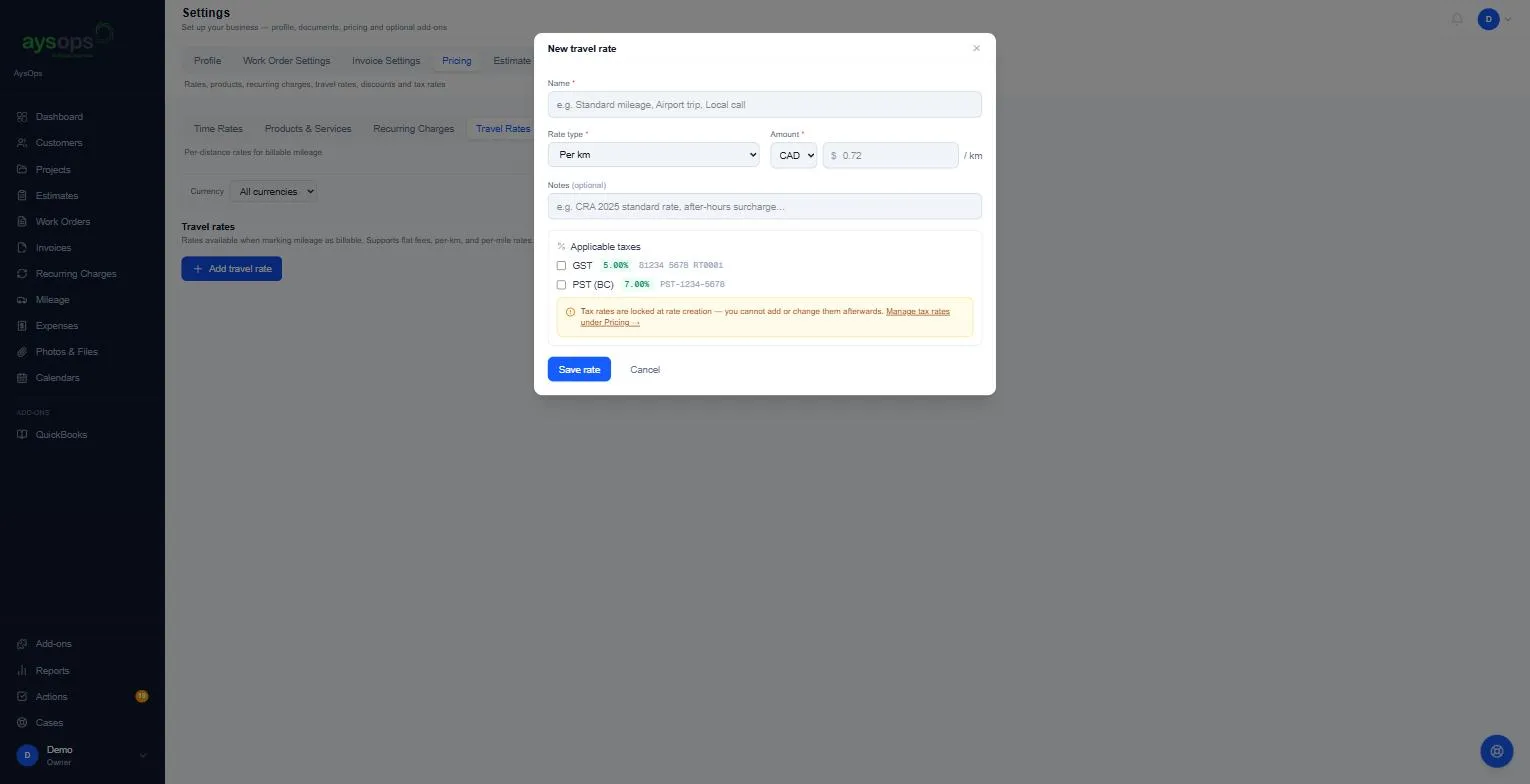
- Fill in:
- Name (required): for example “Standard mileage”, “Airport trip” or “Local call”.
- Rate type (required): Per km, Per mile or Flat rate.
- Amount (required) and its currency (CAD or USD). For example 0.72 per km.
- Notes (optional): for example “CRA 2025 standard rate”.
- Applicable taxes: tick any that apply. They’re locked once the rate is created.
- Click Save rate.
What happens next
Section titled “What happens next”The rate appears in the list, for example “Help Docs Mileage · Per km · CA$0.72/km · GST 5.00%”, and is offered when you mark a trip as billable. See Log a trip.
If something goes wrong
Section titled “If something goes wrong”- The rate isn’t offered on a trip: it’s in a different currency from the customer’s documents, or it’s archived.
- To change a used rate: archive it and add a new one; trips already billed keep their charge. Travel rates can’t be edited.
- “Travel rate saved, but its taxes could not be attached. Delete it and add it again with its taxes.”: the rate was saved without its taxes. It hasn’t been used yet, so delete it and add it again with the taxes ticked.
Archive or delete a travel rate
Section titled “Archive or delete a travel rate”Click the box icon on the right of the rate, then Archive, to hide it from new trips. Archived rates are listed under [number] archived below the list, each with Restore and a bin to delete it. Deleting only works for a rate that’s never been used on a trip. Otherwise: “This travel rate has been used on mileage logs and cannot be deleted. Archive it instead.”
Related articles
Section titled “Related articles”travel rate, mileage rate, per km, per kilometre, per mile, travel charge, trip charge, billable mileage, kilometre rate